# Autenticação Service Provider

### API Key:

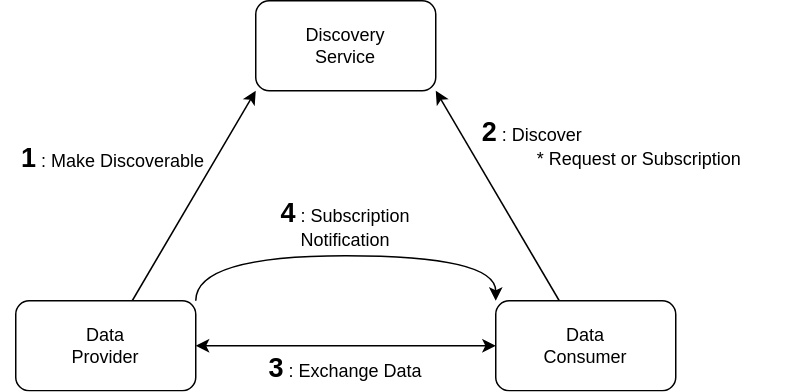
Na comunicação do BR-UTM (imagem abaixo), as requisições devem ser autenticadas e autorizadas. Devido à natureza distribuída da arquitetura, não é viável que cada provedor possua sua lógica de autenticação e autorização.

[![image.png](https://servicos2.decea.mil.br/br-utm/wiki/uploads/images/gallery/2024-04/scaled-1680-/image.png)](https://servicos2.decea.mil.br/br-utm/wiki/uploads/images/gallery/2024-04/image.png)
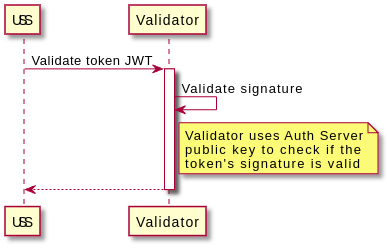
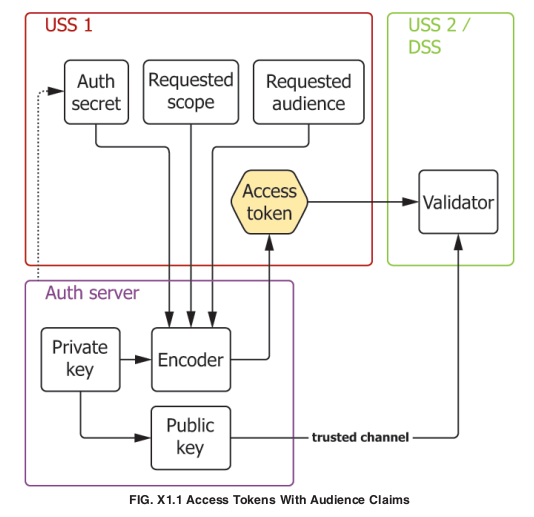
Portando, a solução proposta pela ASTM é a de um servidor de autenticação central onde os provedores obtém tokens OAuth2 codificados e assinados em JWT. O Validator da documentação abaixo checa a validade da assinatura do token, utilizando a chave pública do Auth Server.

[![image.png](https://servicos2.decea.mil.br/br-utm/wiki/uploads/images/gallery/2024-04/scaled-1680-/LgFimage.png)](https://servicos2.decea.mil.br/br-utm/wiki/uploads/images/gallery/2024-04/LgFimage.png)
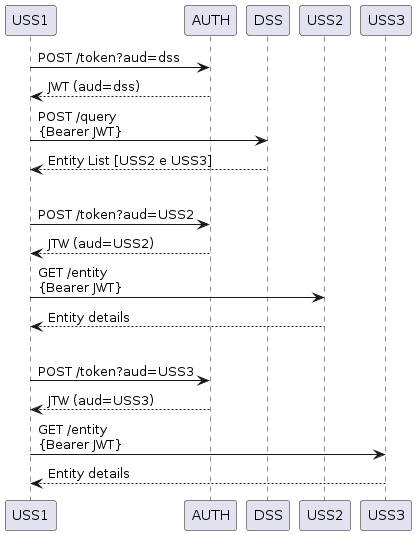
Um exemplo de troca de mensagens autenticadas é:

[![image.png](https://servicos2.decea.mil.br/br-utm/wiki/uploads/images/gallery/2024-04/scaled-1680-/n2zimage.png)](https://servicos2.decea.mil.br/br-utm/wiki/uploads/images/gallery/2024-04/n2zimage.png)
### Uso da API Key  


Com sua API Key, você pode realizar ações programaticamente no ECO-UTM:

1. <span style="background-color: rgb(224, 62, 45);">Insira a sua API Key no *header* da requisição;</span>
2. <span style="background-color: rgb(224, 62, 45);">Insira o `scope` </span>
3. <span style="background-color: rgb(224, 62, 45);">Insira o `intended_audience`</span>  
    
    1. <span style="background-color: rgb(224, 62, 45);">Em caso de comunicação com outro USS, o preencha com o conteúdo do campo `manager` da resposta do DSS.</span>

### Validator

[![image.png](https://servicos2.decea.mil.br/br-utm/wiki/uploads/images/gallery/2024-06/scaled-1680-/Pbcimage.png)](https://servicos2.decea.mil.br/br-utm/wiki/uploads/images/gallery/2024-06/Pbcimage.png)

#### Implementação

Código de exemplo para início da implementação do Auth Server e do Validator em Go

<details id="bkmrk-c%C3%B3digo-exemplo-packa"><summary>Código exemplo</summary>

```go
package main

import (
	"encoding/json"
	"flag"
	"log"
	"net/http"
	"os"
	"strings"

	"github.com/golang-jwt/jwt"
)

var (
	keyFile       = flag.String("private_key_file", "auth.key", "OAuth private key file")
	publicKeyFile = flag.String("public_key_file", "auth.pem", "OAuth public key file")
)

func verifyToken(token string) (bool, error) {
	bytes, err := os.ReadFile(*publicKeyFile)
	if err != nil {
		log.Panic(err)
	}

	publicKey, err := jwt.ParseRSAPublicKeyFromPEM(bytes)
	if err != nil {
		log.Panic(err)
	}

	parts := strings.Split(token, ".")
	err = jwt.SigningMethodRS256.Verify(strings.Join(parts[0:2], "."), parts[2], publicKey)
	if err != nil {
		return false, nil
	}
	return true, nil

}

func main() {

	http.HandleFunc("/validate", func(w http.ResponseWriter, r *http.Request) {
		tokenString := r.URL.Query().Get("token")
		valid, err := verifyToken(tokenString)
		if err != nil {
			log.Panic(err)
		}

		log.Println(valid)
	})

	http.HandleFunc("/token", func(w http.ResponseWriter, r *http.Request) {
		
		token := jwt.NewWithClaims(jwt.SigningMethodRS256, jwt.MapClaims{
			"aud":   "aud",
			"scope": "scope",
			"iss":   "iss",
			"exp":   "exp",
			"sub":   "sub",
		})

		// Read private key
		bytes, err := os.ReadFile(*keyFile)
		if err != nil {
			log.Panic(err)
		}
		privateKey, err := jwt.ParseRSAPrivateKeyFromPEM(bytes)
		if err != nil {
			log.Panic(err)
		}

		// Sign and get the complete encoded token as a string using the secret
		tokenString, err := token.SignedString(privateKey)
		if err != nil {
			log.Panic(err)
		}

		resp := make(map[string]string)
		resp["access_token"] = tokenString
		jsonResp, err := json.Marshal(resp)
		if err != nil {
			log.Fatalf("Error happened in JSON marshal. Err: %s", err)
		}
		w.WriteHeader(http.StatusOK)
		w.Header().Set("Content-Type", "application/json")
		w.Write(jsonResp)
		return

	})

	log.Fatal(http.ListenAndServe(":9096", nil))
}
```

</details><details id="bkmrk-eco-utm-autenticator"><summary>Eco-UTM Autenticator Public Key</summary>

```
-----BEGIN PUBLIC KEY-----
MIGeMA0GCSqGSIb3DQEBAQUAA4GMADCBiAKBgHkNtpy3GB0YTCl2VCCd22i0rJwI
GBSazD4QRKvH6rch0IP4igb+02r7t0X//tuj0VbwtJz3cEICP8OGSqrdTSCGj5Y0
3Oa2gPkx/0c0V8D0eSXS/CUC0qrYHnAGLqko7eW87HW0rh7nnl2bB4Lu+R8fOmQt
5frCJ5eTkzwK5YczAgMBAAE=
-----END PUBLIC KEY-----
```

</details>### Lista de endpoints  


**A lista completa de *endpoints* também está disponível neste [link](http://montreal.icea.decea.mil.br:64235/swagger)<span style="background-color: rgb(224, 62, 45);">, [neste arquivo OpenAPI](https://servicos2.decea.mil.br/br-utm/wiki/attachments/31) e [nesta coleção no Insomina.](https://servicos2.decea.mil.br/br-utm/wiki/attachments/32)</span>**

#### ECO-UTM

A URL base para os seguintes *endpoints* é `<a href="http://montreal.icea.decea.mil.br:64235/">http://montreal.icea.decea.mil.br:64235/</a>`

---

<table border="1" class="align-center" id="bkmrk-get-%2Fuss%2Fflights" style="font-family: var(--font-body); font-size: 14px; width: 100%; height: 29.7969px; border-width: 0px;"><colgroup><col style="width: 75px;"></col><col></col></colgroup><tbody><tr style="height: 29.7969px;"><td style="height: 29.7969px; border-width: 0px; background-clip: padding-box; color: white; border-radius: 5px; background-color: rgb(97, 175, 254);">**GET**</td><td class="align-left" style="height: 29.7969px; border-width: 0px;">/token</td></tr></tbody></table>

Aprovar token de autenticação do provedor associado ao usuário

<details id="bkmrk-query-parameters-vie"><summary>Path Param</summary>

<table border="1" style="border-collapse: collapse; width: 100%; height: 59.5938px;"><colgroup><col style="width: 50.0642%;"></col><col style="width: 50.0642%;"></col></colgroup><tbody><tr style="height: 29.7969px;"><td style="height: 29.7969px;">intented\_audience</td><td style="height: 29.7969px;"><span style="color: rgb(0, 0, 0);">user da entetidade de destino da mensagem</span>  
</td></tr><tr style="height: 29.7969px;"><td style="height: 29.7969px;">scope</td><td style="height: 29.7969px;"><span style="color: rgb(0, 0, 0);">escopo da requisição</span></td></tr><tr><td>apikey</td><td><span style="color: rgb(0, 0, 0);">chave recebida do ICEA</span></td></tr></tbody></table>

</details><details id="bkmrk-bearer-token-que-tok"><summary>Bearer</summary>

<table border="1" style="border-collapse: collapse; width: 100%; height: 193.969px;"><colgroup><col style="width: 50.0642%;"></col><col style="width: 50.0642%;"></col></colgroup><tbody><tr style="height: 113.781px;"><td style="height: 113.781px;">token</td><td style="height: 113.781px;"><span style="color: rgb(224, 62, 45);"><span style="color: rgb(0, 0, 0);">Bearer token gerado</span></span>  
</td></tr></tbody></table>

</details><details id="bkmrk-response-%7B-%22timestam"><summary>Código exemplo python</summary>

```ht
response = requests.get(
            f"{AUTH_URL}/token",
            params={
                "grant_type": "client_credentials",
                "intended_audience": "localhost",
                "scope": "utm.constraint_management",
                "apikey": "brutm",
            },
        )
```

</details><details id="bkmrk-response-200-success"><summary>Response</summary>

<table border="1" style="border-collapse: collapse; width: 100%; height: 59.5938px;"><colgroup><col style="width: 50%;"></col><col style="width: 50%;"></col></colgroup><tbody><tr style="height: 29.7969px;"><td style="height: 29.7969px;">200  
</td><td style="height: 29.7969px;">Success  
</td></tr><tr style="height: 29.7969px;"><td style="height: 29.7969px;">403  
</td><td style="height: 29.7969px;">Non-Authoritative Information</td></tr></tbody></table>

</details><details id="bkmrk-response-body-access"><summary>Response Body</summary>

<table border="1" style="width: 100%;"><tbody><tr><td style="width: 15.145%;">access\_token</td><td style="width: 84.855%;">token de acesso ao ECO-UTM</td></tr></tbody></table>

</details>---